Unlimited tracking
Track all Salesforce objects and fields without limits, so every data change has a complete, searchable history.
True Field History is a free Salesforce AppExchange app for unlimited field history tracking and audit trails. Track every field on every Salesforce object, see who changed what and when, and restore a previous value in one click. No 20-field limit, no 18-month cutoff, and your history stays inside your own org.
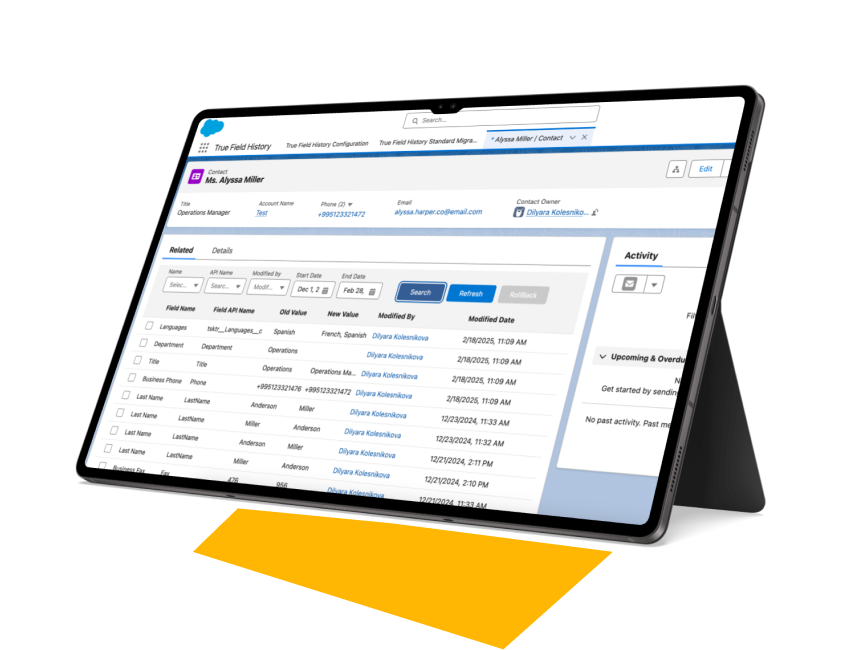
Native Field History Tracking covers up to 20 fields per object and keeps history for 18 months. That is fine for a quick look, but it stops where audits begin: when an auditor asks about a contract value from two years ago, or a bulk import overwrites thousands of records overnight.
| Capability | Standard field history | True Field History |
|---|---|---|
| Fields tracked | Up to 20 per object | All fields, no limit |
| Objects | Selected standard and custom objects | All Salesforce objects |
| Retention | 18 months in the UI | As long as you need |
| Restore a previous value | Manual re-entry | One-click rollback |
| Search the history | Related list per record | Filters by field, API name, user and date range |
| Existing history | — | Migrated from the standard tracker |
| Storage | Salesforce | Salesforce, or optional Google Drive archive |
| Price | Included | Free |
Track all Salesforce objects and fields without limits, so every data change has a complete, searchable history.
Each entry records the user who made the change, the old and new value, and the exact time, updated live.
Restore a field to a previous value in one click. Undo a wrong edit or a faulty import without re-typing anything.
Find the change that matters by field name, API name, user or date range, instead of scrolling through related lists.
Bring your existing standard field history into the app, so the record of past changes continues without gaps.
Lightning Ready and installed as an unmanaged package, so your admins and developers can see and adapt the code.
A short walkthrough of tracking, filters and one-click rollback inside Salesforce.
Salesforce admins, CRM managers and operations leads use it when "who changed this?" needs a fast, provable answer.
Financial, insurance, healthcare and nonprofit teams need a change log that covers every relevant field and goes back further than 18 months. Pull it with filters when the auditor asks.
Field history for audits →An integration sync, a Flow or a bulk import overwrites values across many records. See exactly what changed and roll fields back instead of restoring from a backup.
How True Field History works →When AI agents start updating records, you need a clear trail of every change they make. Full field history makes agent actions reviewable and reversible.
Field history and AI readiness →Open the listing, click Get It Now and install the package into a sandbox or production org.
Select the objects and fields you want to follow. There is no cap, so you can start broad and narrow later.
Import your existing standard field history, and every new change is recorded from that moment on.
A step-by-step PDF that walks your admin through installing True Field History and every feature in it. Leave your email and we will send it to you.

True Field History is a free Salesforce app by TrueSolv that tracks changes to all fields on all Salesforce objects, with no 20-field limit and no 18-month cutoff. It records who changed what and when, lets you filter the history and restore a previous value in one click. It is available on AppExchange.
Yes. The app is free on AppExchange, with no license fee and no time limit.
Yes. The app runs natively in your org and stores history in Salesforce under your existing security model. Archiving older history to Google Drive is optional and only happens if you turn it on.
Standard tracking is limited to 20 fields per object and keeps history for 18 months. True Field History tracks all fields on all objects, keeps history as long as you need, adds filters by field, API name, user and date, and lets you roll a value back in one click.
Yes. The app migrates existing records from the standard field history tracker, so your change log continues without a gap.
History records are stored in your org, so they count toward data storage. For orgs that track many fields, the optional Google Drive archive helps keep storage costs under control.
The code is installed into your org and is fully visible and editable by your admins and developers. You are not locked into a vendor, and you can adapt the app to your own processes.
A Salesforce administrator with permission to install packages. We recommend installing in a sandbox first, then in production. The setup guide covers each step.
What native tracking covers, where it falls short and how teams close the gap.
Read the article →A closer look at how the app records, filters and restores changes.
Read the article →Why a complete change log matters before AI agents start editing your records.
Read the article →The team behind True Field History has 15+ years of Salesforce experience and 150+ delivered projects. If an off-the-shelf app does not fit your process, we can extend this one or build a new one.
Install the app for free, get the setup guide, or book a 30-minute call and our team will help you configure it for your org.